structlog-journald#


Structlog processor to send logs to journald.
Documentation: https://structlog-journald.readthedocs.io
Installation#
To install structlog-journald, run:
pip install structlog-journald
Or with uv:
uv add structlog-journald
Usage#
Add the structlog_journald.JournaldProcessor to your list of structlog processors.
It will do nothing if the journald socket is not available,
in other words, the app was not started by systemd.
To let the log have more useful information, you should also add these processors before JournaldProcessor:
CallsiteParameterAdderformat_exc_info
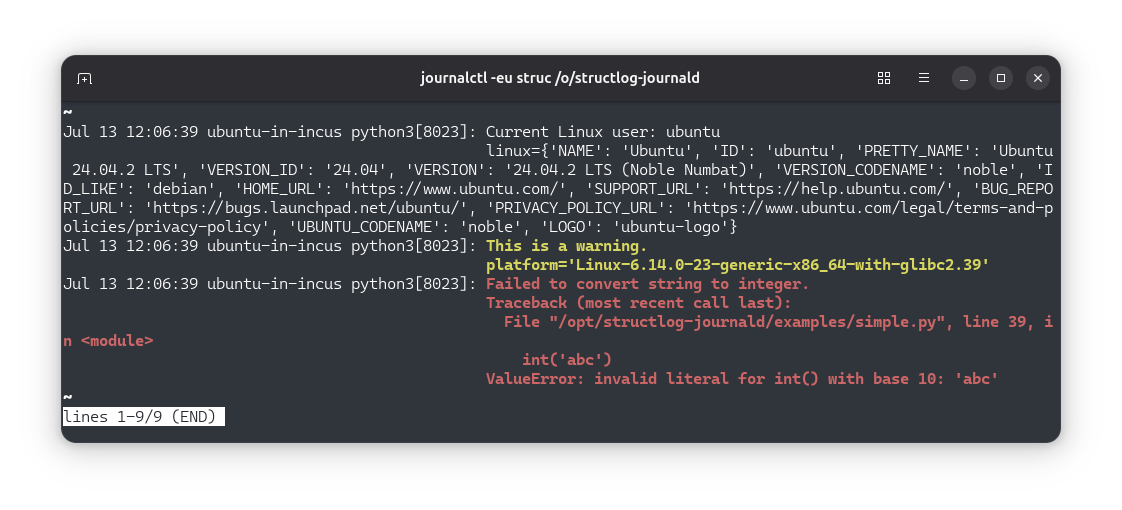
Example:
import getpass
import logging
import platform

import structlog

from structlog_journald import JournaldProcessor


structlog.configure(
    processors=[
        structlog.contextvars.merge_contextvars,
        structlog.processors.add_log_level,
        structlog.processors.CallsiteParameterAdder(),
        structlog.processors.format_exc_info,
        structlog.dev.set_exc_info,
        structlog.processors.TimeStamper(fmt='%Y-%m-%d %H:%M:%S', utc=False),
        structlog.processors.EventRenamer('message'),
        JournaldProcessor(),
        # This processor should be added for development environment only.
        structlog.dev.ConsoleRenderer(),
    ],
    # In this example, we want to print log entries of all levels
    wrapper_class=structlog.make_filtering_bound_logger(logging.NOTSET),
    context_class=dict,
    logger_factory=structlog.WriteLoggerFactory(),
    cache_logger_on_first_use=True,
)

log = structlog.stdlib.get_logger()

user = getpass.getuser()


log.info('Current Linux user: %s', user, linux=platform.freedesktop_os_release())
log.warning('This is a warning.', platform=platform.platform())
try:
    int('abc')
except ValueError:
    log.exception('Failed to convert string to integer.')